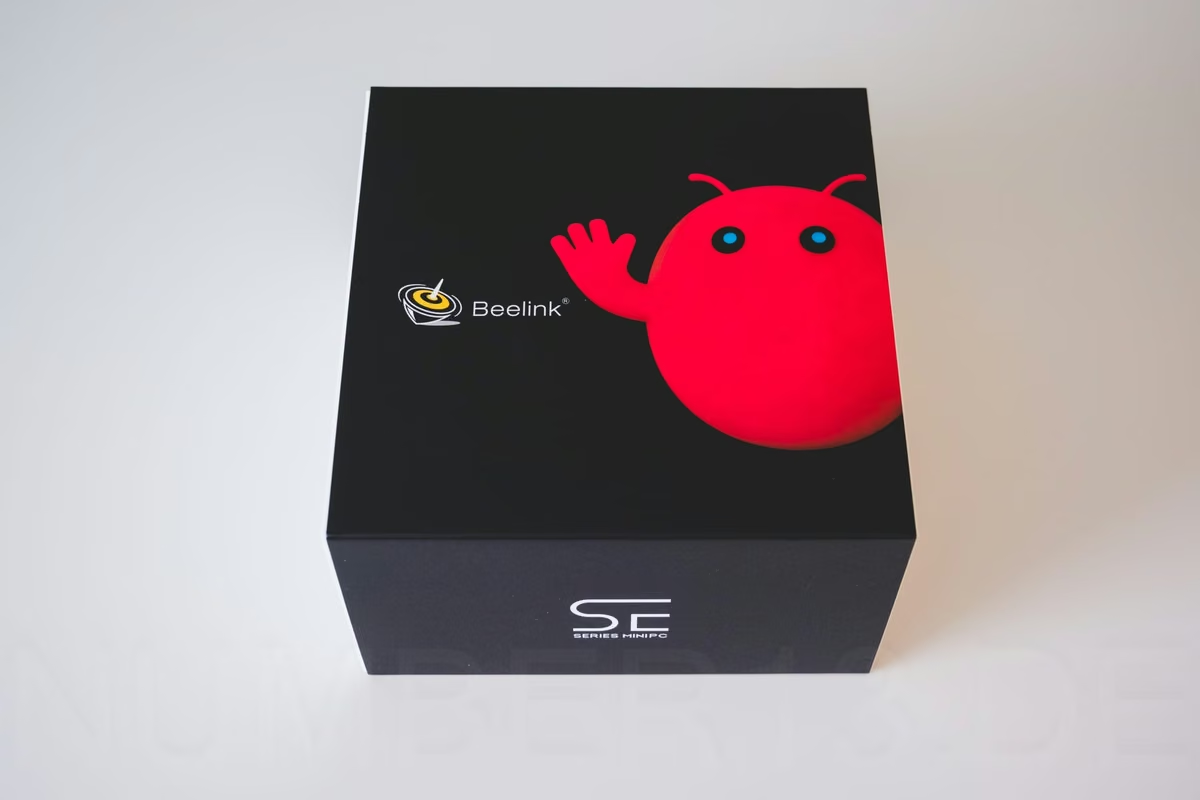
Context & Target Audience
The Beelink SEi13 AI combines a conventional x86 mini PC with a separate Houmo AI accelerator. The Intel Core i7-13620H handles Ubuntu, office applications, the browser, and regular software, while the NPU runs local language and vision models. Its 24 GB of memory is separate from the 32 GB of system memory and is available exclusively to compatible AI models.
This makes the mini PC less suitable for ordinary office users than for technically experienced users who want to run language models locally and keep sensitive data away from cloud model providers. The tested preorder configuration was listed for US$1,739 on August 12, 2026. That price is put into perspective by the value of the AI accelerator: the separately available Houmo LQ50-24 already cost US$1,299 on the same date.
Beelink provided the review unit to us free of charge. No additional payment was made. The manufacturer had no influence on the content or conclusion of this review.
Specifications
The Beelink SEi13 AI in our review configuration has the following specifications:
- Processor: Intel Core i7-13620H, 10 cores, 16 threads, up to 4.9 GHz, and 24 MB cache
- Graphics: Intel UHD Graphics, 64 Execution Units, and up to 1.5 GHz
- System memory: 32 GB Micron LPDDR5, soldered
- AI accelerator: Houmo LQ50 with two NPU cores and 24,448 MB of dedicated memory
- AI performance: according to the manufacturer, up to 160 TOPS for compatible local models
- SSD: 1 TB Crucial CT1000E100SSD8, M.2 2280 PCIe 4.0 x4
- Network: Intel I226-V with 2.5 Gbit/s
- Wi-Fi: Intel Wi-Fi 6 AX200 and Bluetooth 5.2
- Display outputs: HDMI, DisplayPort 1.4a, and Thunderbolt 4/USB-C
- Expansion: two M.2 2280 slots, occupied by the SSD and AI accelerator from the factory
- Operating system: Ubuntu 24.04.4 LTS with OpenClaw preinstalled
- Dimensions: 135 × 135 × 44.7 mm excluding feet
- Power supply: Huntkey HKA12019063-0A3, rated at 19 V/6.32 A (120.08 W)
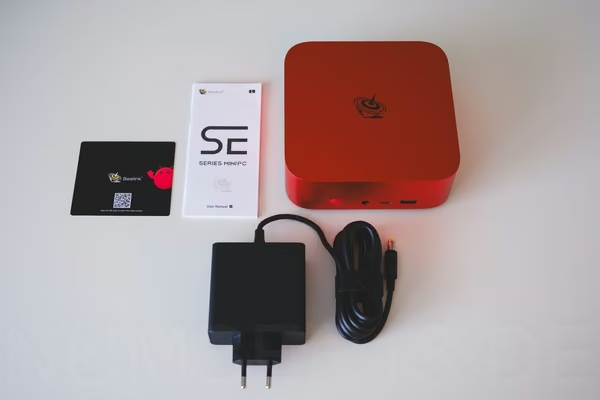
- Package contents: mini PC, power supply, HDMI cable, manual, and OpenClaw quick-start guide
- Warranty: three years according to the manufacturer
Design, Build Quality & Maintenance
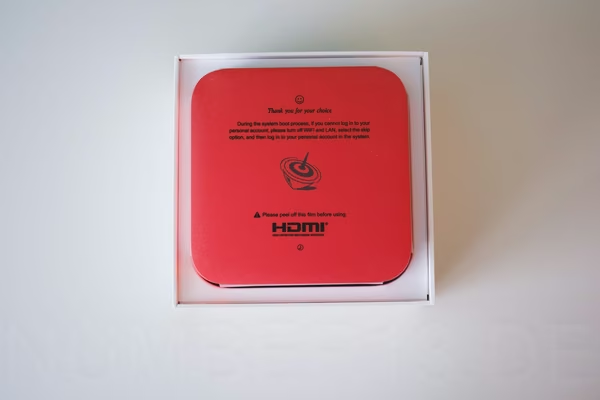
The SEi13 AI stands out much more than the usually black or gray mini PCs thanks to its red chassis. The review unit feels high-quality and is cleanly assembled. Nothing wobbles, and there is no creaking during normal handling. Within the mini PC category, however, it is one of the larger models.
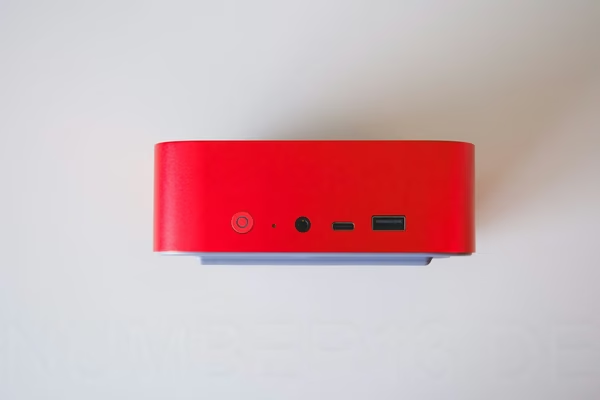
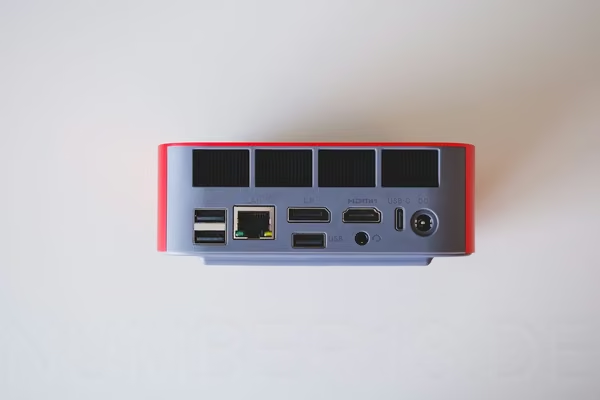
The front includes USB-A, USB-C, and an audio jack, among other ports. The rear provides additional USB ports, 2.5GbE, HDMI, DisplayPort, Thunderbolt/USB-C, and the power connector. The large openings above the ports also serve as exhaust vents.
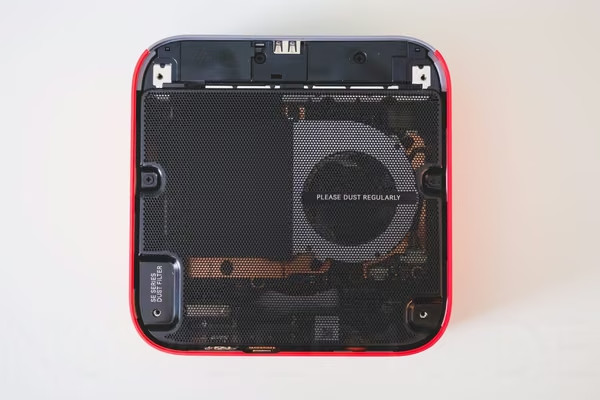
A removable dust filter covers almost the entire underside, making it easier to clean the system. Removing it reveals the large blower fan, the copper cooling assembly, and the separate Houmo NPU. The 32 GB of RAM, by contrast, is soldered to the motherboard and cannot be upgraded.
Everyday Performance (Office & Multimedia)
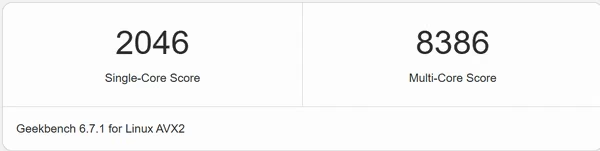
Ubuntu, the browser, and the applications used during setup respond quickly. In Geekbench 6.7.1, the Core i7-13620H scores 2,046 points in the single-core test and 8,386 points in the multi-core test. This provides more than enough CPU performance for office work, browsing, multitasking, and everyday productivity tasks. The results also provide a solid foundation for typical development work.
The Crucial SSD delivers 5,037 MB/s read and 4,473 MB/s write performance in the short test. It cannot sustain that speed during very large writes, however: after roughly 228 GiB, the fast SLC cache was exhausted, and the write rate subsequently dropped to an average of about 165 MB/s. The SSD remained cool, reaching a maximum of 37.9 °C. After a 15-minute pause, about 44.7 GiB of fast write capacity was available again.
YouTube playback consumed 22.49 W at Full HD and 37.58 W at 4K.
Creative and Gaming Performance
The Beelink completed the full Blender Classroom render in 352 seconds. This result demonstrates usable CPU rendering performance. During the run, the complete mini PC drew an average of 88.66 W and consumed 8.09 Wh.
The integrated Intel UHD Graphics with 64 EUs is best suited to older or less graphically demanding games. Anyone wanting to play games on it should reduce the resolution and detail settings accordingly. The graphics processor is primarily intended for desktop use, video playback, and simple graphics tasks.
Noise & Cooling
All 16 threads were fully utilized during the 20-minute CPU stress test. The processor clock remained stable at around 3.52 GHz, the CPU reached a maximum of 72 °C, and the SSD reached 31.9 °C. There was no sign of thermal throttling. The 30-minute sustained Qwen workload also completed without NPU or temperature errors. The NPU remained exceptionally cool at no more than 48.5 °C.
Subjectively, the fan is audible under heavy CPU load but is not annoyingly loud. Its noise remained consistent and tolerable throughout the stress test, without noticeable ramping up and down. The exhaust air felt only lukewarm.
Power Consumption & Efficiency
Power Consumption
| Test | Average (watts) |
|---|---|
| Powered off | 1.12 |
| Suspend | 1.32 |
| Ubuntu – idle with DisplayPort | 16.39 |
| Ubuntu – lowest headless idle with power-saving settings | 15.18 |
| Speedometer browser workload | 28.96 |
| YouTube playback – Full HD | 22.49 |
| YouTube playback – 4K | 37.58 |
| Qwen3.5-9B – 30-minute sustained load | 31.46 |
| CPU stress test | 77.42 |
| Blender Classroom | 88.66 |
Idle power consumption of around 15 to 16 W is relatively high for a mini PC. Even closing OpenClaw and Qwen reduced idle power draw only from 16.39 to 16.24 W. The AI services alone therefore do not explain the base consumption.
Energy Efficiency
The following table shows energy consumption in the complete Blender Classroom benchmark. For direct comparability, we used the same test and measurement method as for the mini PCs reviewed previously.
| Manufacturer – Model | Energy consumed (watt-hours) | Duration (seconds) |
|---|---|---|
| Geekom AE7 | 5.4 | 302 |
| Geekom XT13 Pro | 5.6 | 410 |
| Geekom A6 | 6.4 | 390 |
| NiPoGi AM16 | 6.6 | 648 |
| Beelink SEi13 AI | 8.1 | 352 |
| NiPoGi Hyper H2 | 9.1 | 455 |
| Geekom Air12 Lite | 9.9 | 1,826 |
| NiPoGi E2 | 10.2 | 1,790 |
| NiPoGi E1 | 10.5 | 1,820 |
| BeeLink SEi12 | 10.6 | 444 |
| NiPoGi N97 | 12.2 | 1,926 |
| Beelink EQ13 | 13.2 | 1,734 |
Local AI in Practice
The most important difference from a normal mini PC is the separate AI accelerator with 24 GB of dedicated memory. Qwen3.5-9B is preinstalled and runs on the AI accelerator. The included chat interface lets users interact with the model in much the same way as an online chatbot. Prompts are processed and responses are generated directly on the Beelink.
Qwen Feels Smooth in Chat
Qwen generated an average of 18.35 tokens per second. Tokens are small text components from which the model assembles its responses. In practice, this made the text appear quickly and smoothly on the screen. The model also completed a 30-minute sustained test with 65 requests without errors or any slowdown.
The complete mini PC required an average of 31.46 W under this sustained AI load. Temperatures and speed remained stable, with no sign of throttling. In addition to text, Qwen can analyze images: in a photo of the OpenClaw quick-start guide, it recognized the heading, the essential instructions, and the QR code.
Gemma Works Too, but Requires Manual Setup
We also tried three variants of Google's Gemma model. The tokens-per-second figure shows how quickly text is output. A higher value means a faster response.
| Model | Deployment | Output tokens per second |
|---|---|---|
| Qwen3.5-9B Q4_0 | Preinstalled | 18.35 |
| Gemma 4 E2B | Set up manually | 49.54 |
| Gemma 4 E4B | Set up manually | 27.39 |
| Gemma 4 26B-A4B | Set up manually | 26.58 |
The results come from separate practical tests, show only output speed, and say nothing about response quality.
The Gemma models are neither preinstalled nor available through a simple download in the interface. They require a separate Houmo runtime environment. The Qwen service must also be stopped before switching models because all models use the same NPU memory. Arbitrary models from Hugging Face or in the common GGUF format therefore cannot be loaded as easily as they can with Ollama, for example.
How Good Is the Local Model?
Out of the box, the SEi13 AI uses Qwen3.5-9B as its default local model. To provide a rough indication of response quality, it completed 60 tasks from the LiveBench benchmark. They cover programming, data analysis, language, mathematics, and logical reasoning. Gemma 4 26B-A4B answered the same questions. Historical responses from three OpenAI models provide additional comparison values.
| Model | LiveBench result |
|---|---|
| Qwen3.5-9B Q4_0 | 70.31% |
| Gemma 4 26B-A4B | 74.06% |
| OpenAI o1-preview | 71.46% |
| OpenAI GPT-4 Turbo | 65.60% |
| OpenAI GPT-4o, August 2024 | 64.54% |
The tasks date from 2024 and may already have been included in the training data of models released later.
In this sample, the preinstalled Qwen ranked between historical versions of o1-preview and GPT-4 Turbo. Gemma achieved the highest score but must be set up manually and cannot be selected through Beelink's interface.
The results serve only as a rough guide. The small task sample does not cover current knowledge, image understanding, long conversations, or work with tools.
Comparison with a GeForce RTX 5060 Ti
For comparison, Qwen3.5-9B Q4_0 also ran on a GeForce RTX 5060 Ti with 16 GB of graphics memory. Both platforms used the same model size and quantization, each in the model format optimized for that platform.
The RTX 5060 Ti generated text around 3.7 times faster, but drew roughly seven times as much additional power as the Beelink’s NPU.
| Feature | Beelink SEi13 AI | GeForce RTX 5060 Ti 16 GB |
|---|---|---|
| Qwen3.5-9B Q4_0 | 18.35 tokens/s | 67.31 tokens/s |
| Time for 512 output tokens | 27.9 s | 7.7 s |
| Dedicated AI or graphics memory | 24 GB | 16 GB |
| Additional power consumption from Qwen | ~ 15 W | ~ 104–107 W |
| AI efficiency (tokens/s per additional watt) | ~ 1.22 | ~ 0.64 |
Overall, the RTX 5060 Ti offers considerably more speed. The Beelink's strengths, by contrast, are its better energy efficiency and 24 GB of dedicated AI memory. That is eight gigabytes more than the tested graphics card. It can therefore run larger models that do not fit completely into the RTX 5060 Ti's 16 GB of graphics memory. Those models must, however, be approved and provided by Houmo for the NPU.
OpenClaw: From Chat to a Local Assistant
Beelink supplies the SEi13 AI not only with a simple Qwen chat interface but also explicitly promotes it with OpenClaw preinstalled. The software builds on top of the language model and adds persistent conversations, access to approved files, extensions, tools, and automated tasks. The aim is to turn the pure text generator into a local assistant that can also work on tasks on the user's own computer.
Possible use cases include summarizing approved documents, analyzing notes or system information, and handling multi-step tasks with different tools. OpenClaw can preserve context across multiple conversations and automate recurring workflows. Depending on the setup, web search, browser control, or messaging can also be added. Together with Qwen's image understanding, the mini PC can incorporate photos and screenshots into these workflows.
OpenClaw, the local Qwen server, and the NPU start automatically with Ubuntu. This allows the Beelink to operate as a permanently available local assistant without requiring the individual components to be started manually after a normal reboot.
Privacy and Offline Operation
During direct chat, the input and response remain on the Beelink. This is particularly useful when confidential text or internal documents should not be sent to a cloud model provider. However, this does not mean that OpenClaw is fully offline by default. Web search, downloads, updates, and other external tools can still access the internet.
Special Features, Bugs & Oddities
Ubuntu and OpenClaw Initial Setup
During setup, users should follow the PDF Initial Setup User Guide.pdf, which opens through the Instructions desktop launcher. It also explains how to enable launchers initially marked with red X symbols by right-clicking and selecting “Allow Launching.” The markings indicate only the missing GNOME trust status and are not a malware warning.
During OpenClaw onboarding, port 8000 was incorrectly saved despite port 8080 being displayed, which initially prevented the agent from reaching Qwen. After correcting it to port 8080, OpenClaw worked. Some patience is required after a reboot because the local model takes around one and a half minutes to become available again.
Handle Kernel Updates Cautiously for Now
In our testing, Houmo's driver package 1.3 stopped working after the update to kernel 7.0. Booting kernel 6.17 again restored NPU functionality. This is only a temporary workaround until a compatible driver is available, however; security updates should not be disabled permanently.
1 TB SSD with Only a 100 GiB Root Drive
The SSD partitioning is also unusual. Although a 1 TB SSD is installed, the root drive was only 100 GiB from the factory and was nearly full before testing. Around 828 GiB was present in the LVM pool but was not assigned to the normal file system. It appears that the root volume was not expanded accordingly during system preparation.
Suspend and Network Security
After resuming from suspend on one occasion, Ubuntu returned to the desktop, but the Intel I226-V network adapter remained stuck at “Cable unplugged.” Only a reboot restored the link.
On our review unit, the Qwen server was accessible on the local network without authentication using the factory-installed software version; the Ubuntu firewall was also disabled. We could not determine whether other or newer shipping configurations are affected as well.
Connectivity & Expandability
HDMI, DisplayPort, Thunderbolt/USB-C, USB-A, audio, and Bluetooth worked during testing. According to Beelink, three displays can be operated simultaneously via HDMI, DisplayPort, and Thunderbolt 4.
In the local test, the Intel I226-V port achieved 2.327 Gbit/s when sending and 2.041 Gbit/s when receiving. In a line-of-sight test using iperf3, the Intel AX200 Wi-Fi achieved around 279 Mbit/s upload and 293 Mbit/s download.
Internal expandability is limited. The 32 GB LPDDR5 memory is soldered. Although there are two M.2 2280 slots, one is occupied by the system SSD and the other by the Houmo AI accelerator. An additional SSD can therefore be installed only in place of the AI module. Users who want to retain the AI functionality must replace the existing SSD to gain more storage. The removable dust filter, on the other hand, makes regular maintenance pleasantly easy.
Pros & Cons
Pros
- Local AI: 24 GB of separate NPU memory for compatible models
- Good value, considering that the AI module alone costs around US$1,299
- Privacy: local inference without a cloud provider
- 32 GB of fast LPDDR5 memory
- Performance: fast Core i7-13620H for office and productivity tasks
- Pleasantly quiet operation
- Cooling: low temperatures with no apparent throttling
- Network: fast 2.5GbE
- Build quality: premium, distinctive chassis
- Maintenance: easily removable dust filter
Cons
- Memory cannot be upgraded
- QLC SSD with a significant performance drop after the SLC cache
- Software still suffers from teething problems
- NPU supports only models approved by Houmo or converted appropriately
- Software and firmware updates for the NPU are cumbersome to obtain
- Comparatively high idle power consumption of around 15 to 16 W
Conclusion and Buying Recommendation
The Beelink SEi13 AI has a separate AI module with 24 GB of dedicated memory. This allows AI models to run directly on the mini PC, so personal documents, source code, and other sensitive data do not need to be sent to external providers.
The preinstalled Qwen3.5-9B generated around 18 tokens per second, while the additionally tested Gemma 4 26B-A4B generated around 27 tokens per second. Both models are therefore responsive enough for simple programming tasks, troubleshooting, and image analysis. With suitable OpenClaw tools, home automation tasks and other recurring workflows on the home network can also be implemented.
Apart from its AI features, the mini PC provides enough performance for office work, conventional programming, basic video editing, light image editing, and less graphically demanding games. It remains pleasantly quiet even under load and incurs no usage-based fees for model requests.
Overall, we can recommend the SEi13 AI to users looking for a compact and quiet computer for local AI models, who want to process sensitive data on their own hardware and use Qwen, Gemma, or OpenClaw for programming, image analysis, and home automation.

